
SEO has moved beyond keywords. Search engines and AI assistants want to understand the concepts your content covers, not just the words you use. That's exactly what the new Entities feature in Slim SEO Pro does.
What is an entity?
An entity is a named concept from schema.org - a recognized idea with a name, type, and optional metadata. Instead of vague keyword tags, you're telling Google and AI tools exactly what topics a post discusses.
Here are some examples:
- Technologies like React or Kubernetes
- Products like iPhone 16 or Tailwind CSS
- Industry topics like serverless computing or accessibility
- SEO concepts like Core Web Vitals or structured data
Note that entities are different from your site's author or organization profile. That's what the Schema feature is for. Entities focus on the subjects your content explores.
Why should you care?
Sharper topic signals. Rather than hoping Google figures out your content from keyword density, you explicitly declare the concepts a post covers. This makes ranking for relevant queries much more predictable.
More AI citations. Tools like ChatGPT, Perplexity, and Google's AI Overviews rely on structured data to decide who gets cited. The clearer your entity signals, the more likely an AI will recommend your content as a reliable source.
Reusable across posts. Create an entity once and attach it to as many articles as you like. No need to re-enter the same details over and over.
Better search visibility. Structured data can trigger enhanced search features - knowledge panels, FAQ carousels, sitelinks - that make your listings stand out.
How entities work in Slim SEO Pro?
Create an entity
Head to Slim SEO > Settings > Entities and click Add Entity. You'll see a popup where you can fill in:
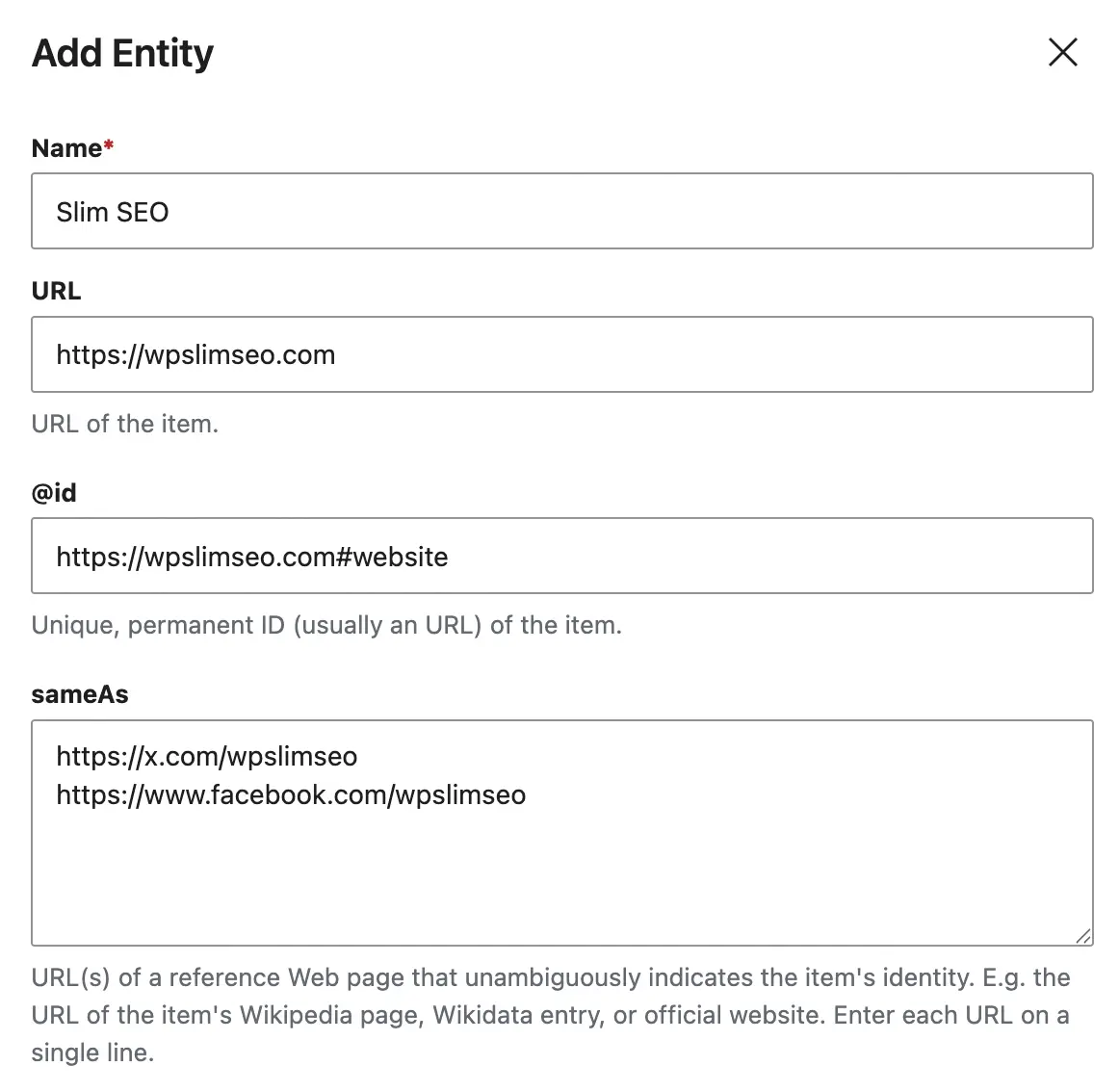
- Name - the only required field. Something like "Kubernetes" or "technical SEO".
- URL - the official page for this concept, like a project homepage or Wikipedia article.
- @id - a unique identifier that helps search engines link related mentions across your site.
- Same as - additional URLs (one per line) pointing to related pages like docs or social profiles.
- Description - a short summary of what the entity is.
- Type - the schema.org type.
Thingworks for most topics, but you can pick something more specific likeSoftwareApplicationif it fits.
Hit Add Entity and you're done. You can edit or delete entities anytime.
Attach entities to posts
Open any post and find the Entities tab in the SEO meta box. Browse or search your entity library, then pick the ones that apply.
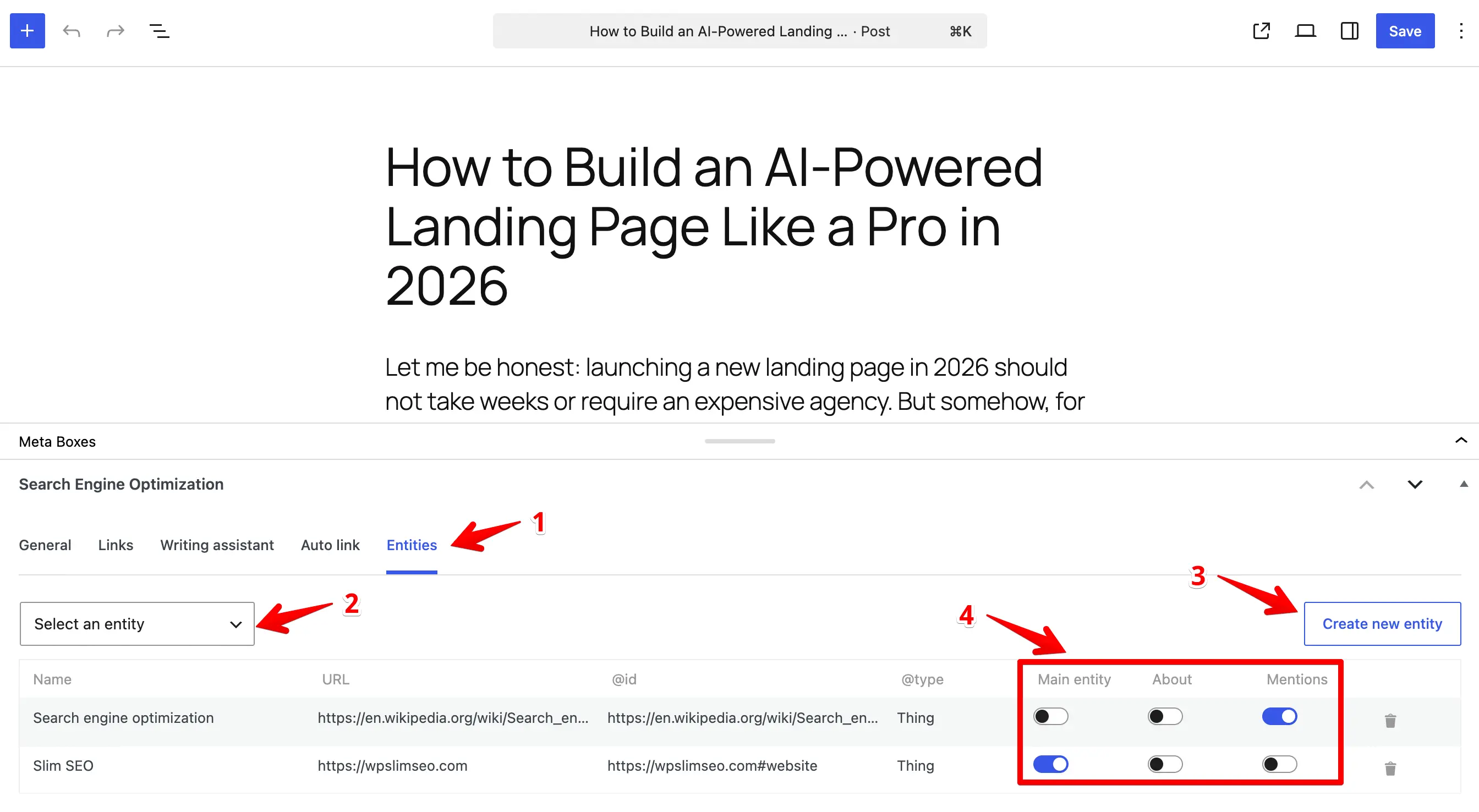
For each selected entity, choose a role:
- Main Entity - the primary topic of the post. Only one per post. This becomes
mainEntityin yourArticleschema. - About - topics the post covers in depth. These become the
aboutproperty of theArticleschema. - Mentions - topics referenced briefly. These become the
mentionsproperty of theArticleschema.
That's it. The plugin automatically injects these into your post's JSON-LD output - no extra configuration needed.
Entities vs. Schema: what's the difference?
Slim SEO Pro offers two structured data tools, and they work best together.
Schema builds the foundation. It defines your site identity (Organization, Person), page structure (WebPage, BreadcrumbList), and content type (Article). This is where you set up company profiles, author bios, and organizational details.
Entities add the subject layer. They identify the topics a post discusses and attach as relationships (mainEntity, about, mentions) to the schema your site already outputs.
Think of it this way: Schema tells Google what your page is. Entities tell Google what your page is about.
Ready to try it?
If you're already using Slim SEO Pro, head to Settings > Entities to start creating and assigning entities to your content. For full setup details and FAQ, check out the complete documentation.
Currently using Google AI Overview and Slim SEO Pro the company site is getting a first page, first paragraph search result hit! That has got to be good!