
You publish a post. Then you wait. Is it on Google yet? To find out, you open Google Search Console, paste the URL into the inspection tool, and wait again. One URL at a time.
That works for one post. It does not work for a site with hundreds of posts, pages, and categories.
Slim SEO Pro 1.12 adds Index Monitor. It checks whether Google has indexed each of your posts, pages, and terms, and shows the answer right in the WordPress admin. No more copying URLs into Search Console.
What Index Monitor does
Index Monitor adds an Index column to your lists of posts, pages, and terms. Each item gets a status icon. Hover over it to see the status and Google's own explanation.
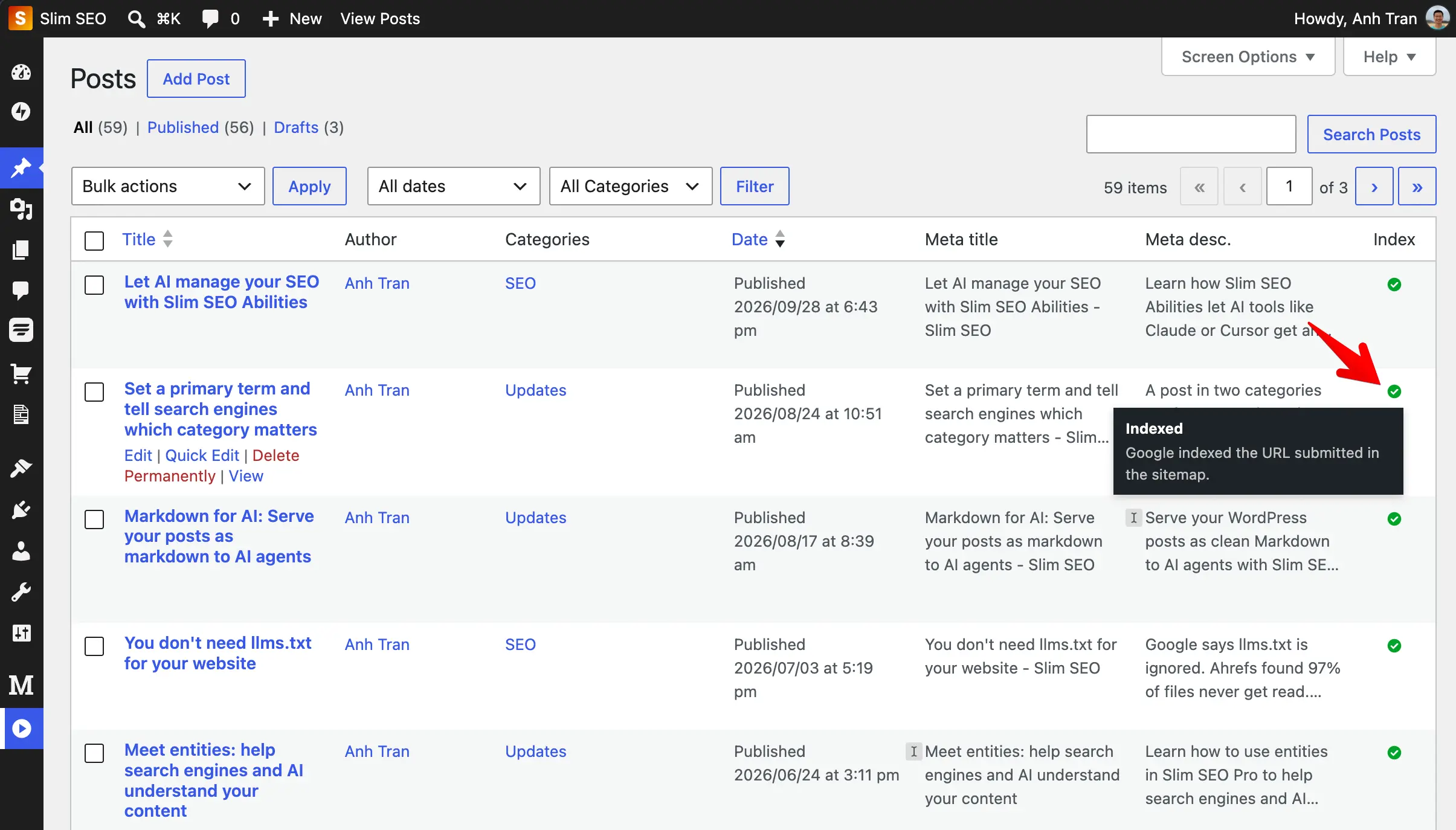
The statuses are simple:
| Status | What it means |
|---|---|
| Indexed | Google has indexed the URL. |
| Not Indexed | Google knows the URL but chose not to index it, or the URL redirects to another page. |
| No Index | Google does not index the URL because of a noindex tag or robots.txt. |
| Attention | Something needs a look: Google has not found the URL, the page returns a 404 error, or Google picked a different main URL. |
| Queued / Checking | The plugin is waiting to check the URL, or checking it now. |
| N/A | The plugin could not get the status this time, for example because the daily limit ran out. It tries again on the next run. |
If you set a post to noindex in Slim SEO, a small red dot appears next to the icon. So you can see at a glance when a page is hidden on purpose (like paginated archive pages), and when Google left it out on its own.
How it works
Index Monitor gets its data from the URL Inspection API of Google Search Console. You see the same result as when you inspect a URL in Search Console yourself.
The work happens in the background:
- The plugin finds all public posts, pages, and terms and adds them to a queue.
- It checks the queued URLs with Google a few times a day.
- It saves the results, so your admin pages stay fast.
The plugin does not check every URL every day. It checks again based on the last result:
- Indexed URLs: every 30 days.
- No Index URLs: every 7 days.
- Not Indexed and Attention URLs: the next day, because these are the ones you want to fix.
It also checks a URL again when you publish it, when you change its slug, or when you change the permalink structure. Changing permalinks changes every URL on your site, so Slim SEO Pro warns you before you save and then re-checks your URLs.
Index Monitor only reads the index status. It does not send URLs to Google.
Getting started
Index Monitor needs permission to read your Search Console data. To give it, you create a free Google app with your own Google account. You do this once, and it takes about 10 minutes.
Why your own app? The connection runs between your site and Google, under your own Google account, with no third-party service in the middle.
Follow the step-by-step connection guide. Don't skip the step to publish your app: an app left in testing mode loses its connection after 7 days. After you connect, there is nothing else to do. On a large site, the first full check can take a few days.
Settings
Go to Settings > Slim SEO > Index Monitor. The defaults work for most sites, but you can change them:
| Setting | Default |
|---|---|
| Re-check interval for indexed URLs | 30 days |
| Re-check interval for noindex URLs | 7 days |
| Cron interval | 12 hours (twice a day) |
| URLs per run | 500 |
Google allows about 2,000 checks per day for each site. Keep URLs per run × runs per day under that number. The defaults use 1,000 checks per day, so you have room to spare.
See all settings in the documentation.
Why we built it this way
A few choices we made, and why:
- It only reads the status. Google already has a way to find your pages: your XML sitemap. What site owners miss is a clear view of the result. So Index Monitor reads the status and leaves crawling to Google.
- It uses your own Google app. The connection runs between your site and Google, under your own Google account. No third-party service sits in the middle.
- It runs in the background. Checking hundreds of URLs takes time. Doing it on a schedule and saving the results keeps your admin pages fast.
- It re-checks smartly. Indexed pages rarely change status, so they wait 30 days. Pages with problems are checked again the next day, because those are the ones you are fixing.
Why you should use it
A page that is not indexed gets no search traffic, no matter how good it is. Most site owners only find out weeks later, when the traffic never comes.
With Index Monitor, you see problems while you can still fix them:
- New posts that Google discovered but has not indexed yet.
- Pages that return a 404 error, for example after you delete old content, or look like an empty page to Google (a "soft 404").
- Pages where Google picked a different canonical URL than the one you set.
- Pages set to noindex by mistake.
And you see all of this in the place where you already manage your content.
Frequently asked questions
Does Index Monitor submit my URLs to Google?
No. It only reads the index status from Google Search Console. To help Google find your pages, keep your XML sitemap submitted in Search Console.
How long until I see results?
The plugin starts checking right after you connect. On a small site, you see most statuses within a day. On a large site, the first full check can take a few days because of Google's daily limit.
Will it slow down my site?
No. All checks run in the background on a schedule. The plugin saves the results, and the admin pages only read the saved data.
Can I turn it off?
Yes. Go to Settings > Slim SEO > Features and turn off Index Monitor (Pro). You can also choose to delete all indexing data when you turn the feature off.
Conclusion
Index Monitor answers a simple question for every page on your site: is it on Google? You no longer need to check URLs one by one in Search Console. Once your pages are indexed, use Analytics in Slim SEO Pro to see how they perform in search.
Update to Slim SEO Pro 1.12 and connect your Google app to get started. Read the Index Monitor documentation for the full setup guide.
Don't have Slim SEO Pro yet? Get it here.